For example:
You are trying to run c:\Program Files (x86)\Notepad++\notepad++.exe using start command, a message will be popped up saying, there is no such command.
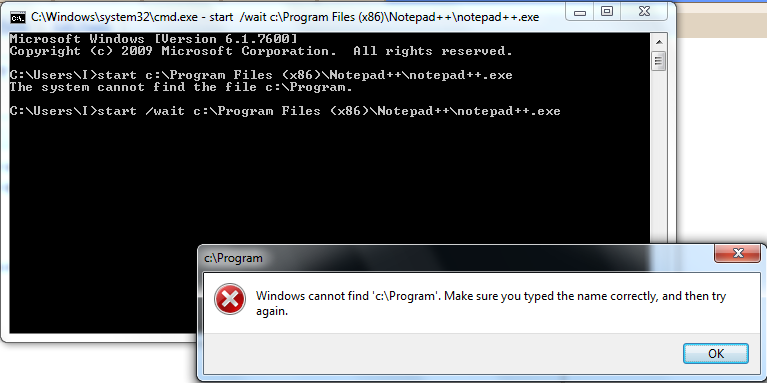

Putting double quotes around the command will also not help you (start /wait "c:\Program Files (x86)\Notepad++\notepad++.exe" = Wrong). It will just pop up another command window.
Yes... There is a solution for this. If you see the help of start command, the answer is clear there. But most of us will not get a hook on that...
START ["title"] [/D path] [/I] [/MIN] [/MAX] [/SEPARATE | /SHARED]
[/LOW | /NORMAL | /HIGH | /REALTIME | /ABOVENORMAL | /BELOWNORMAL]
[/AFFINITY <hex affinity>] [/WAIT] [/B] [command/program]
[parameters]
Got it? First parameter with quotes given to START command is considered as the title for the command window. Hence, if start /wait "c:\Program Files (x86)\Notepad++\notepad++.exe" is given, path to notepad++ will be taken as the title for the new command window that will be opened.
So, the possible solution is,
start /wait "TitleForNewWindow" "c:\Program Files (x86)\Notepad++\notepad++.exe"

Hope this helps some people!! :)
Kindle Wireless Reading Device, Wi-Fi, Graphite, 6" Display with New E Ink Pearl Technology

